Showing posts with label VMware. Show all posts

Thursday, December 1, 2011

VMware: Business Critical Applications: SQL Server Rolling Patch Upgrade using Standby VM

SQL Server patching is a common use case for high availability deployments. When people think about minimizing down time for patch upgrades, most people will think of SQL Server failover clustering or SQL Server database mirroring. Those are the two SQL Server native availability features that support rolling patch upgrade. Did you know that you could also perform rolling patch upgrades with just a standby virtual machine (VM) if you are running SQL Server on VMware?
With VMware vSphere, a virtual disk can be hot removed or hot added onto a VM without impacting services running in the VM. Given that, you could put together a rolling patch upgrade solution that's similar to the SQL Server failover cluster share everything architecture by using a standby VM. The SQL Server data and log disks are shared between the primary and standby VMs, although they are only assigned to one VM at a time. The primary and the standby VM each runs an identical copy of the SQL Server binary. When you need to apply SQL Server patches to the primary VM, you can switch ownership of the SQL Server data and log disks from the primary VM to the standby VM. The standby SQL Server VM can continue servicing application requests. The followings describe the steps and process flows for the solution.
Step 1: Configure standby VM
  • Create a standby SQL Server VM, if one does not yet exist, using VMware templates or cloning technologies.
  • Confirm SQL Server logins, job, and other instance level configurations are configured identically between the standby and primary VM.

Step 2: Patch standby VM
  • Apply service patches to the standby SQL Server VM.

Step 3: Hot remove SQL Server resources from primary.
  • On the primary VM, stop client connections to the database(s). One way this could be accomplished is to disable the virtual machine network interface. Connection to the virtual machine can be made using a management interface for Remote Desktop Service connections or vSphere client console connection.
  • Detach database(s) from primary SQL Server by issuing thesp_detach_db T-SQL command.
  • From Windows Disk Management right click the data and log volumes and select Offline to prepare them for hot-remove.
  • From the vCenter client, remove SQL Server data and log virtual disk(s) from the running primary SQL Server VM.

Step 4: Hot add resources to the SQL Server standby VM.
  • From the vCenter client, add the virtual disk(s) containing the SQL Server data and log files to the standby VM.
  • From Windows Disk Management, bring the disks online if needed and confirm that the disk(s) are mounted with the correct drive letter(s) assigned.
  • Attach SQL Server database(s) by issuing the sp_attach_db T-SQL command(s).


Step 5: Switch role
  • On the standby VM, enable application network traffic to the VM.
  • The old standby VM is the new primary, SQL Server service is resumed for the application(s).
  • The old primary VM is ready for service patching and may be left in the standby role if desired until the next patching cycle.

During steps 3 to 5, application(s) would experience temporary connection issues to the SQL Server. Similar to the failover clustering or database mirroring requirements, reconnection is expected to be handled by the application layer, with zero data loss, and any in flight transactions would need to be resubmitted. All operations in steps 3 through 5 are metadata only operations, and are expected to execute instantaneously.
If you would like the ability to do rolling patch upgrades, but don't want to put up with the cost and complexity of maintaining a failover cluster or a mirrored database, this solution provides a viable alternative for you. For those of you that are into scripting, the process flow can be automated using PowerShell and PowerCLI.
-Wanda
Wanda He, Technical Solutions Architect

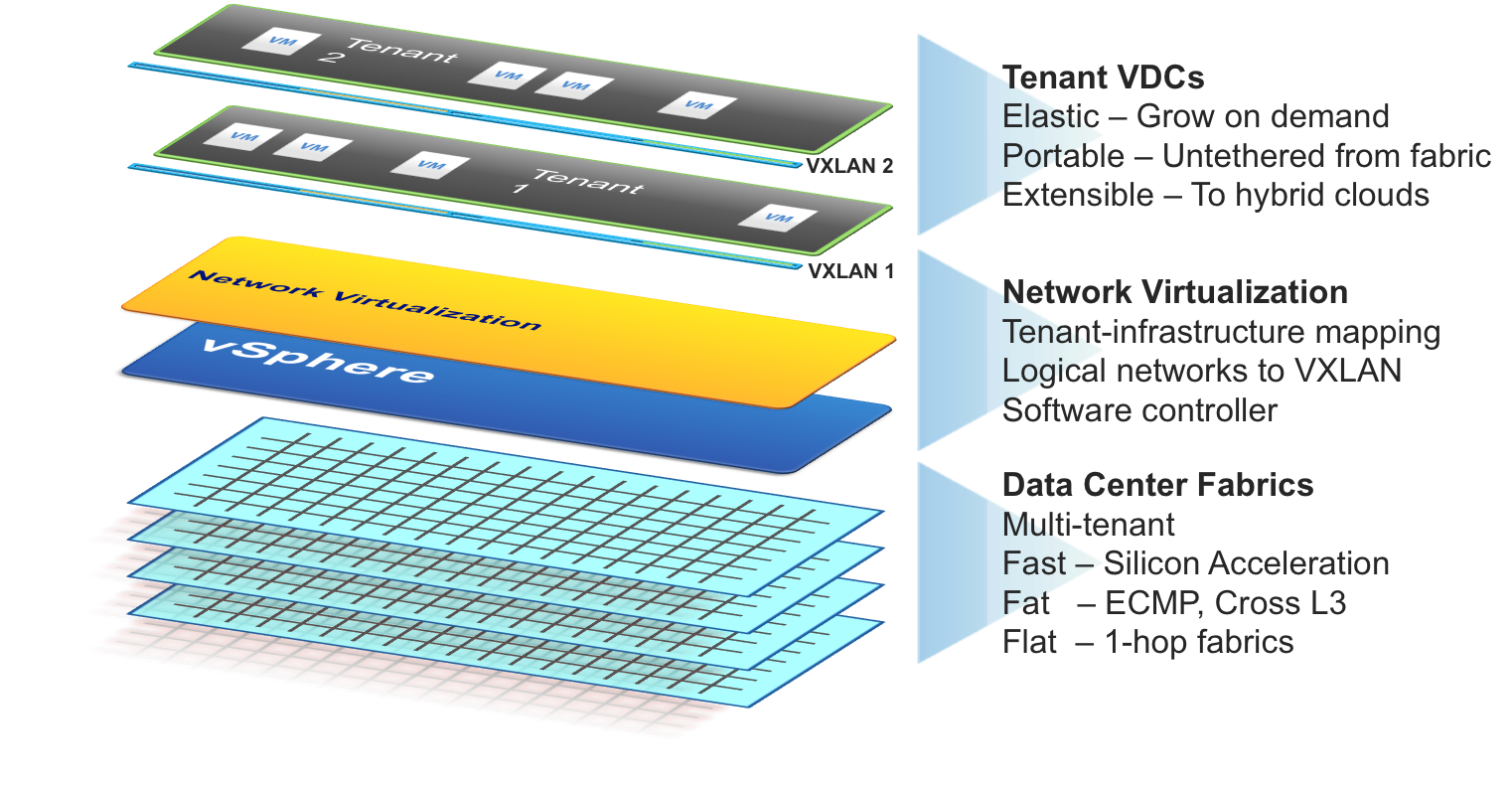
Webinar - Building Next Generation Virtualized Data Centers with VXLAN


Join Arista and VMware technical leaders as they go in-depth into the new Virtual eXtensible LAN technology -VXLAN.  VXLAN delivers on the ability to execute Stateful Layer-3 vMotion's - the live migration of a workload to any server in the network, at any time, in seconds, regardless of the IP addressing topology of your infrastructure.  VXLAN overcomes the segmentation boundaries and broadcast domain constraints of 802.1q VLANs, replacing them with a more granular and scalable model for segmentation and scaling.  In this session you will learn about VXLAN, the framing format, encapsulation mechanism, how to prepare the network and infrastructure, and how to operate and troubleshoot this environment.
Please register and you will receive a confirmation email reserving your spot in this webinar!

December 2, 2011 - 10:00am PDT

Wednesday, November 30, 2011

Manitoba VMUG Meeting - Jan 12, 2012

Manitoba VMUG Meeting
UPDATED DATE
Thursday January 12, 2011
6:00 p.m. - 9:00 p.m.
 Red River College - Roblin Centre
Main Lecture Hall
160 Princess Street
Winnipeg MB R3B 1K9
Click here for driving directions
Please note the meeting originally scheduled for December 12, has been rescheduled for Thursday, January 12, 2011.
Meeting Highlights
  • 6:00 p.m. Welcome/Pizza
  • 6:15 p.m. VMware Presentation – vShield
  • 7:00 p.m. Trend Micro Presentation – Today's Data Center with Tomorrow's Security Now
  • 8:00 p.m. Customer Presentation/ Product Demo
  • 8:30 p.m. Q&A/Prize Draws
  • 9:00 p.m. Conclude
Thank you to our meeting sponsor:

Register at: http://www.myvmug.org/e/in/eid=262&source=5

Thursday, November 10, 2011

Friday, November 4, 2011

Storage vMotion of a Virualized SQL Server Database


Storage vMotion of a Virualized SQL Server Database
vSphere Storage vMotion (svMotion) enables the live migration of disk files belonging to virtual machines (VMs). svMotion helps to eliminate the down time of the applications running in VMs when the virtual disk  files containing the applications' data have to be moved between storage devices for the purpose of hardware maintenance, upgrades, load-balancing storage resources, or proactive disaster recovery.
svMotion is the missing piece in liberating VMs and VMs' associated files completely from the physical hardware on which they reside. Because of the importance of svMotion in the virtual landscape, we at VMware Performance Engineering Labs conducted a study involving the svMotion of the virtual disk files of a VM hosting a large SQL Server database. The focus of the study was to understand:
  • The impact on performance of the SQL Server database when migrating physical files of different database components such as data, index, and log.
  • The effect of the I/O characteristics of the database components on the migration time of the virtual disk containing the files of those components.
The results from the study show:
  • A consistent and predictable disk migration time that was largely influenced by the capabilities of the source and the destination storage hardware.
  • That the I/O characteristics of the database components do influence disk migration time.
  • A 5% to 22% increase, depending on the VM load conditions, in the CPU cost of a transaction of the database workload while migrating a virtual disk containing the physical files of the database.
For more details, refer to the white paper "Storage vMotion of a Virtualized SQL Server Database"


Thursday, November 3, 2011

New Book: VMware vSphere 5 Performance: Solving CPU, Memory, Storage, and Networking Issues

VMware vSphere is the industry's most widely deployed virtualization solution. However, performance problems are inevitable and require an in-depth understanding of the interaction and relationship between software and hardware. Aimed at VMware administrators and engineers and written by a team of VMware experts, this resource provides guidance on common CPU, memory, storage, and network-related problems. Plus, step-by-step instructions walk you through techniques for solving problems and shed light on possible causes behind the problems Divulges troubleshooting methodologies, performance monitoring tools, and techniques and tools for isolating performance problems. Details the necessary steps for handling CPU, memory, storage, and network-related problems. Offers understanding on the interactions between VMware vSphere and CPU, memory, storage, and network. VMware vSphere X Performance is the resource you need to diagnose and handle VMware vSphere performance problems.

Introducing VMware vCenter Protect Essentials Plus


VMware vCenter Protect Essentials Plus (Formerly, Shavlik NetChk Protect), is a complete on-premise management system designed to meet the needs of the SMB. VMware vCenter Protect Essentials Plus offers agentless, easy-to-deploy and cost-effective management of physical and virtual machines, software update deployment in 28 languages, asset discovery, configuration, power management, antivirus and endpoint security.
Get centralized patch management and asset inventory for Windows and third party applications for both virtual and physical machines with vCenter Protect Essentials. Add centralized antivirus, power management, configuration management and ITScripts with vCenter Protect Essentials Plus. Reduce cost and complexity with an integrated approach to IT security and compliance.
Here is a link to download the trial.
Here is a link to a webcast on Nov 8, 2011 –  11:00am EST
Here is a link to the product page.
by  on NOVEMBER 3, 2011

Tuesday, November 1, 2011

VMware Labs presents its latest fling VDSPowerCli

PowerShell is a scripting language Microsoft developed to help administrators manage the Windows environment. Third parties can write their own snap-ins (dynamic linked libraries) to implement new commands, which are called cmdlets. With VDSPowerCli, users can use the cmdlets provided by PowerCLI to manage vSphere Distributed Switch(VDS). VDSPowerCli gives you the ability to manage:

• VMware vSphere Distributed Switch
• Distributed Port Group
• Distributed Port

Download and try out VDSPowerCli

Webcast: See the Mythbusting Presentation that Had VMworld Buzzing


Quest Software
See the Most Talked-About VMworld Session:Mythbusters Goes Virtual
Webcast: Mythbusters Goes Virtual
Date/Time: Tuesday, November 8, 2011 at 11:00 a.m. ET / 8:00 a.m. PT
Expert virtualization blogger Eric Sloof and virtualization evangelist Mattias Sundling are giving you another chance to catch the most talked-about presentation at VMworld. Join them as they expose the truth about four of the biggest virtualization myths in Mythbusters Goes Virtual. 
With VMware vSphere getting new and improved features with every release, keeping up to date with what's happening right now in virtualization is more important than ever. So we've gathered the hottest virtualization topics and put them to the test to determine if they are myths or the truth! Register today and see which myths we bust!
Quest Software
5 Polaris Way
Aliso Viejo, CA 92656
USA
Phone: (800) 306-9329
Fax: (949) 754-8999
E-mail: info@quest.com