Original Post:
http://blogs.vmware.com/vsphere/2012/05/new-storage-features-in-vmware-view-51.html
VMware's flagship VDI product, VMware View, has a new release<http://blogs.vmware.com/euc/2012/05/whats-new-in-view-51.html> coming out. I don't normally blog about EUC (End User Computing) or VDI as it is not my area of expertise. However VMware View 5.1 has a number of really neat new storage related features which are making use of enhancements which were first introduced in vSphere 5.0.
View Storage Accelerator
This first feature was originally called CBRC (Content Based Read Cache). This was initially introduced in vSphere 5.0. Although it is a vSphere feature, it is designed specifically for VMware View. With the release of View 5.1, the View Storage Accelerator feature can now be used to dramatically improve the read throughput for View desktops. This will be particularly useful during a boot storm or anti-virus storm, where many virtual machines could be reading the same data from the same base disk at the same time. The implementation of the accelerator is done by taking an area of host memory for cache, and then creating 'digest' files for each virtual machine disk. This feature will be most useful for shared disks that are read frequently, such as View Composer OS disks. It will be available 'out of the box' with View 5.1; no additional components will need to be installed. This feature will significantly improve performance. More here<http://blogs.vmware.com/euc/2012/05/optimizing-storage-with-view-storage-accelerator.html>.
32 ESXi nodes sharing NFS datastores
This storage feature is also quite significant. While VMware has been able to create 32 node clusters for some time, VMware View would only allow a base disk on an NFS datastore to be shared between 8 ESXi hosts for the purposes of linked clone deployments. View 5.1 lifts this restriction, and now 32 ESXi hosts can host linked clones deployed from the same base disk on a shared NFS datastore. This feature will significantly improve scalability.
View Composer API for Array Integration (VCAI) aka Native NFS Snapshots
Although this feature is a Technology Preview in View 5.1, it is another cool storage feature of the release. View desktops deployed on VMware's linked clone technology consumes CPU on the ESXi hosts, and network bandwidth when they are deployed on NFS datastores. With this new Native NFS Snapshot feature via VAAI (vSphere Storage APIs for Array Integration), customers can offload the cloning operation to the storage array, minimizing CPU usage and network bandwidth consumption. Once again this enhanced VAAI functionality<http://blogs.vmware.com/vsphere/2011/07/new-enhanced-vsphere-50-storage-features-part-3-vaai.html> was introduced in vSphere 5.0 specifically for VMware View. This feature requires a VAAI NAS plugin from the storage array vendor. Once installed and configured, customers will be able to use a storage array vendor's own native snapshot feature for deploying View desktops. Selecting this new desktop deployment method can be done via standard work-flows in View Composer. More here<http://blogs.vmware.com/euc/2012/05/view-composer-array-integration-tech-preview.html>.
I'm sure you will agree that these are very exciting features. By providing a read caching mechanism, offloading snapshots/clones to the storage array and supporting up to 32 hosts sharing a single base disk, VMware View 5.1 now has greater performance and scalability than ever before. Of course, there are many other enhancements, including a vCenter Operations Manager (vCOps<http://www.vmware.com/products/datacenter-virtualization/vcenter-operations-management/overview.html>) extension specifically for View, so please check out the View 5.1 news release<http://www.vmware.com/company/news/releases/vmw-euc-portfolio-05-02-12.html> on VMware.com<http://VMware.com>. For those of you using VMware View, this is definitely a release worth checking out.
[http://blogs.vmware.com/.a/6a00d8341c328153ef014e8a7e2282970d-800wi] <http://twitter.com/#%21/VMwareStorage> @VMwareStorage<http://twitter.com/#%21/vmwarestorage>
Wednesday, May 2, 2012

VMware has announced VMware View 5.1
VMware has announced View 5.1 - the new features and benefits are:
* VMware View Storage Accelerator – VMware View Storage Accelerator (formerly known as Content Based Read Cache) optimizes storage load and improves performance by caching common image blocks when reading virtual desktop images, helping to reduce overall TCO in VMware View deployments.
* VMware View Composer Array Integration (VCAI) – Offered in VMware View 5.1 as a Tech Preview, VCAI will leverage the native cloning abilities in the storage array to offload storage operations within a VMware View environment. As a result, VCAI improves provisioning speeds and management in View Composer and offers another solution for customers wanting to leverage other storage options.
* VMware View Persona Management – New in VMware View 5.1, VMware View Persona Management will extend to physical desktops, enabling IT organizations to preserve user settings across all Windows devices and streamline the migration from physical to stateless virtual desktops.
* VMware vCenter™ Operations for VMware View – Offered as a new add-on to VMware View, VMware vCenter Operations for VMware View will enable administrators to have broad insight into virtual desktop performance. Increased insight can empower administrators to quickly pinpoint and troubleshoot issues, optimize resource utilization and proactively address potential issues in real time.
* VMware View Administrator Enhancements – New performance enhancements to the administrator user interface will deliver faster response times for large-scale desktop environments in the tens-of-thousands. With VMware View 5.1, desktop provisioning with pre-created AD accounts simplifies the process and enhances compliance policy. Administrator enhancements also include editable locations for disposable disk drives.
* RADIUS Support – Support in VMware View 5.1 for RADIUS will enable greater choice for organizations looking to deploy two-factor authentication, while maintaining compatibility with existing choices.
* New VMware View Clients – Users will be able to connect to their VMware View desktop from a variety of mobile and fixed endpoints with updated clients for Mac, Windows and Linux desktops, thin or zero clients and Apple iPad, Android and Amazon Kindle Fire tablets. VMware View 5.1 with PCoIP® adapts to the end users' network connection to provide a high-quality, customized desktop experience over the LAN or WAN.
* VMware View Media Services Enhancements: VMware View 5.1 Local Mode will add multi-monitor support and expanded USB device compatibility, improving the user experience by enabling more peripherals to connect seamlessly into VMware View virtual desktops.
* VMware View Administrator Language Support – Globalization and localization of administrator UI provides a better experience for non-English speaking IT organizations and will enable greater adoption in additional markets. Languages will include French, German, Japanese, Korean and Simplified Chinese.
View 5.1 will be made available in Q2 2012
Original Post: http://feedproxy.google.com/~r/Ntpronl/~3/jcpJGikYBRE/2038-VMware-has-announced-VMware-View-5.1.html
* VMware View Storage Accelerator – VMware View Storage Accelerator (formerly known as Content Based Read Cache) optimizes storage load and improves performance by caching common image blocks when reading virtual desktop images, helping to reduce overall TCO in VMware View deployments.
* VMware View Composer Array Integration (VCAI) – Offered in VMware View 5.1 as a Tech Preview, VCAI will leverage the native cloning abilities in the storage array to offload storage operations within a VMware View environment. As a result, VCAI improves provisioning speeds and management in View Composer and offers another solution for customers wanting to leverage other storage options.
* VMware View Persona Management – New in VMware View 5.1, VMware View Persona Management will extend to physical desktops, enabling IT organizations to preserve user settings across all Windows devices and streamline the migration from physical to stateless virtual desktops.
* VMware vCenter™ Operations for VMware View – Offered as a new add-on to VMware View, VMware vCenter Operations for VMware View will enable administrators to have broad insight into virtual desktop performance. Increased insight can empower administrators to quickly pinpoint and troubleshoot issues, optimize resource utilization and proactively address potential issues in real time.
* VMware View Administrator Enhancements – New performance enhancements to the administrator user interface will deliver faster response times for large-scale desktop environments in the tens-of-thousands. With VMware View 5.1, desktop provisioning with pre-created AD accounts simplifies the process and enhances compliance policy. Administrator enhancements also include editable locations for disposable disk drives.
* RADIUS Support – Support in VMware View 5.1 for RADIUS will enable greater choice for organizations looking to deploy two-factor authentication, while maintaining compatibility with existing choices.
* New VMware View Clients – Users will be able to connect to their VMware View desktop from a variety of mobile and fixed endpoints with updated clients for Mac, Windows and Linux desktops, thin or zero clients and Apple iPad, Android and Amazon Kindle Fire tablets. VMware View 5.1 with PCoIP® adapts to the end users' network connection to provide a high-quality, customized desktop experience over the LAN or WAN.
* VMware View Media Services Enhancements: VMware View 5.1 Local Mode will add multi-monitor support and expanded USB device compatibility, improving the user experience by enabling more peripherals to connect seamlessly into VMware View virtual desktops.
* VMware View Administrator Language Support – Globalization and localization of administrator UI provides a better experience for non-English speaking IT organizations and will enable greater adoption in additional markets. Languages will include French, German, Japanese, Korean and Simplified Chinese.
View 5.1 will be made available in Q2 2012
Original Post: http://feedproxy.google.com/~r/Ntpronl/~3/jcpJGikYBRE/2038-VMware-has-announced-VMware-View-5.1.html
Monday, April 30, 2012
McAfee MOVE Antivirus joins the vShield Endpoint Family
[http://blogs.vmware.com/.a/6a00d8341c328153ef0168eaf46bea970c-200wi]<http://blogs.vmware.com/.a/6a00d8341c328153ef0168eaf46bea970c-pi>
<http://blogs.vmware.com/.a/6a00d8341c328153ef0168eaf44a56970c-pi>We have seen a tremendous amount of customer interest in optimizing endpoint security in VMware vSphere and VMware View environments.
<http://blogs.vmware.com/.a/6a00d8341c328153ef0168eaf46bea970c-pi>As server consolidation ratios rise and as large scale virtual desktop infrastructure (VDI) environments roll out it is important to take a fresh look at endpoint security. While the tried and true practice of installing a thick security agent per virtual machine is certainly viable, there is a lot to be gained in taking a new approach that is optimized for the virtual environment.
VMware vShield Endpoint<http://www.vmware.com/products/vshield-endpoint/overview.html> offloads antivirus and anti-malware agent processing to a dedicated secure virtual appliance delivered by VMware partners. Our offload approach dramatically increases consolidation ratios and performance by eliminating anti-virus "storms", streamlines deployment, and satisfies compliance requirements. These capabilities combined with choice of industry leading endpoint security solutions are fundamental to your journey to the cloud.
VMware is proud to announce that McAfee is now shipping the McAfee MOVE Antivirus<http://www.mcafee.com/us/products/move-anti-virus.aspx> solution that integrates with VMware vShield Endpoint. The McAfee MOVE provides powerful, comprehensive, and consistent protection, and is managed and reported by the McAfee ePolicy Orchestrator platform.
With the addition of McAfee we now have four actively shipping solutions with vShield Endpoint including:
Bitdefender Security for Virtualized Environments
http://www.bitdefender.com/sve
Kaspersky Security for Virtualization
http://www.kaspersky.com/products/business/applications/security-virtualization
McAfee MOVE Antivirus
www.mcafee.com/us/products/move-anti-virus.aspx<http://www.mcafee.com/us/products/move-anti-virus.aspx>
Trend Micro Deep Security
http://www.trendmicro.com/us/enterprise/cloud-solutions/deep-security/index.html
Original Post:
http://blogs.vmware.com/vsphere/2012/04/mcafee-move-antivirus-joins-the-vshield-endpoint-family.html
<http://blogs.vmware.com/.a/6a00d8341c328153ef0168eaf44a56970c-pi>We have seen a tremendous amount of customer interest in optimizing endpoint security in VMware vSphere and VMware View environments.
<http://blogs.vmware.com/.a/6a00d8341c328153ef0168eaf46bea970c-pi>As server consolidation ratios rise and as large scale virtual desktop infrastructure (VDI) environments roll out it is important to take a fresh look at endpoint security. While the tried and true practice of installing a thick security agent per virtual machine is certainly viable, there is a lot to be gained in taking a new approach that is optimized for the virtual environment.
VMware vShield Endpoint<http://www.vmware.com/products/vshield-endpoint/overview.html> offloads antivirus and anti-malware agent processing to a dedicated secure virtual appliance delivered by VMware partners. Our offload approach dramatically increases consolidation ratios and performance by eliminating anti-virus "storms", streamlines deployment, and satisfies compliance requirements. These capabilities combined with choice of industry leading endpoint security solutions are fundamental to your journey to the cloud.
VMware is proud to announce that McAfee is now shipping the McAfee MOVE Antivirus<http://www.mcafee.com/us/products/move-anti-virus.aspx> solution that integrates with VMware vShield Endpoint. The McAfee MOVE provides powerful, comprehensive, and consistent protection, and is managed and reported by the McAfee ePolicy Orchestrator platform.
With the addition of McAfee we now have four actively shipping solutions with vShield Endpoint including:
Bitdefender Security for Virtualized Environments
http://www.bitdefender.com/sve
Kaspersky Security for Virtualization
http://www.kaspersky.com/products/business/applications/security-virtualization
McAfee MOVE Antivirus
www.mcafee.com/us/products/move-anti-virus.aspx<http://www.mcafee.com/us/products/move-anti-virus.aspx>
Trend Micro Deep Security
http://www.trendmicro.com/us/enterprise/cloud-solutions/deep-security/index.html
Original Post:
http://blogs.vmware.com/vsphere/2012/04/mcafee-move-antivirus-joins-the-vshield-endpoint-family.html
PMI's Agile Certified Practitioner: A cert is born
The Project Management Institute's new Agile Certified Practitioner certification might be right for you if your organization uses scrum, Lean, Kanban, and XP.
http://www.techrepublic.com/blog/tech-manager/pmis-agile-certified-practitioner-a-cert-is-born/7745
Sent with MobileRSS for iPhone<http://itunes.apple.com/app/mobilerss-pro-google-rss-news/id325594202?mt=8>
Mike Yallits, VTSP
Client Account Manager
ESTI Consulting Services
Cell: 204 294-7773
mike.yallits@esti.ca<mailto:mike.yallits@esti.ca>
http://www.techrepublic.com/blog/tech-manager/pmis-agile-certified-practitioner-a-cert-is-born/7745
Sent with MobileRSS for iPhone<http://itunes.apple.com/app/mobilerss-pro-google-rss-news/id325594202?mt=8>
Mike Yallits, VTSP
Client Account Manager
ESTI Consulting Services
Cell: 204 294-7773
mike.yallits@esti.ca<mailto:mike.yallits@esti.ca>
Sunday, April 29, 2012
Technical Marketing Update 2012 - Week 17
Original Post: http://blogs.vmware.com/vsphere/2012/04/technical-marketing-update-2012-week-17.html
By Duncan Epping<https://plus.google.com/112305325305827926631?rel=author>, Principal Architect.
Technical Marketing Update 2012 - Week 17
Great white paper by Cormac Hogan on Storage Protocols. I know many of you have asked for this in the past, so I am sure you will appreciate this paper that explains the various protocols and how they interoperate with VMware. Excellent work Cormac!
* Storage Protocol Comparison (Cormac Hogan) http://bit.ly/IkXoWP
Blog posts:
* vSphere Security Hardening Report Script for vSphere 5 (William Lam) http://bit.ly/Ju91uU
* Cool tool update: RVTools 3.3 released! (Duncan Epping) bit.ly/INHvor<http://bit.ly/INHvor>
* Removing Previous Local Datastore Label for Reinstall in ESXi 5 (William Lam) http://bit.ly/IfhmSN
* Does VMware Support Shared/Switched SAS? (Cormac Hogan) bit.ly/JD50lT<http://bit.ly/JD50lT>
* What is das.maskCleanShutdownEnabled about? (Duncan Epping) http://bit.ly/JnkKKd
* Demystifying Configuration Maximums for VSS and VDS (Venky Deshpande) bit.ly/JzZ7YC<http://bit.ly/JzZ7YC>
* VAAI Thin Provisioning Block Reclaim/UNMAP In Action (Cormac Hogan) bit.ly/JpTkB2<http://bit.ly/JpTkB2>
* Aggregating datastores from multiple storage arrays into one Storage DRS datastore cluster (Frank Denneman) bit.ly/I3Bx2z<http://bit.ly/I3Bx2z>
* Preparing the hosts in Provider VDCs with PowerCLI (Alan Renouf) bit.ly/IhJ00B<http://bit.ly/IhJ00B>
* SRM 5.0.1 Upgrade with vSphere Replication (Ken Werneburg) bit.ly/I8yIgD<http://bit.ly/I8yIgD>
* Using the vSphere ESXi Image Builder CLI (Kyle Gleed) bit.ly/IhAznV<http://bit.ly/IhAznV>
* Retrieving Information from VMware VDS + Cisco Nexus 1000v (William Lam) bit.ly/Ixeaxu<http://bit.ly/Ixeaxu>
By Duncan Epping<https://plus.google.com/112305325305827926631?rel=author>, Principal Architect.
Technical Marketing Update 2012 - Week 17
Great white paper by Cormac Hogan on Storage Protocols. I know many of you have asked for this in the past, so I am sure you will appreciate this paper that explains the various protocols and how they interoperate with VMware. Excellent work Cormac!
* Storage Protocol Comparison (Cormac Hogan) http://bit.ly/IkXoWP
Blog posts:
* vSphere Security Hardening Report Script for vSphere 5 (William Lam) http://bit.ly/Ju91uU
* Cool tool update: RVTools 3.3 released! (Duncan Epping) bit.ly/INHvor<http://bit.ly/INHvor>
* Removing Previous Local Datastore Label for Reinstall in ESXi 5 (William Lam) http://bit.ly/IfhmSN
* Does VMware Support Shared/Switched SAS? (Cormac Hogan) bit.ly/JD50lT<http://bit.ly/JD50lT>
* What is das.maskCleanShutdownEnabled about? (Duncan Epping) http://bit.ly/JnkKKd
* Demystifying Configuration Maximums for VSS and VDS (Venky Deshpande) bit.ly/JzZ7YC<http://bit.ly/JzZ7YC>
* VAAI Thin Provisioning Block Reclaim/UNMAP In Action (Cormac Hogan) bit.ly/JpTkB2<http://bit.ly/JpTkB2>
* Aggregating datastores from multiple storage arrays into one Storage DRS datastore cluster (Frank Denneman) bit.ly/I3Bx2z<http://bit.ly/I3Bx2z>
* Preparing the hosts in Provider VDCs with PowerCLI (Alan Renouf) bit.ly/IhJ00B<http://bit.ly/IhJ00B>
* SRM 5.0.1 Upgrade with vSphere Replication (Ken Werneburg) bit.ly/I8yIgD<http://bit.ly/I8yIgD>
* Using the vSphere ESXi Image Builder CLI (Kyle Gleed) bit.ly/IhAznV<http://bit.ly/IhAznV>
* Retrieving Information from VMware VDS + Cisco Nexus 1000v (William Lam) bit.ly/Ixeaxu<http://bit.ly/Ixeaxu>
Saturday, April 28, 2012
Find Lex

That's my girl, only people in the theater and she picks the back row at the end...
"it's close to the door daddy" was her logic....
iPerfectPutt: Moncton Math Professor Creates iPhone Putting Aid App
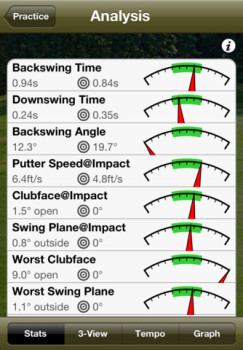
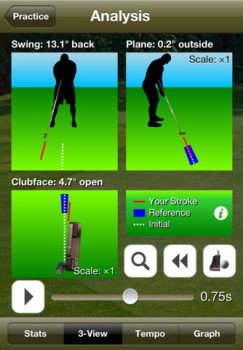
A Moncton math professor has created the ultimate putting aid app for golfers that utilizes the sensors on the iPhone to analyze your stroke. iPerfectPutt is a free download and features the following:
The free iPerfectPutt features provide the following measurements of your putting strokes:
• Swing tempo (backswing/downswing durations)
• Swing plane deviation (inside/outside)
• Clubface angle deviation (open/closed)
• Putt weight (backswing angle, clubhead speed)
iPerfectPutt also provides a free and adjustable metronome to help you practice your swing tempo.
In-app purchases will unlock more features such as the ability to save captured strokes, realtime auditory feedback on all aspects of your putting stroke, simulation of your stroke compared to a reference stroke, and comprehensive data graphs to offer feedback.
In an interview with the CBC, professor Samuel Gaudet noted his motivation to create the app was to improve his short game (like the rest of us), via his math background and use of statistical analysis, and was 1.5 years in the making.
[http://cdn.iphoneincanada.ca/wp-content/uploads/2012/04/iperfectputt-243x350.jpg]<http://www.iphoneincanada.ca/?attachment_id=56548> [http://cdn.iphoneincanada.ca/wp-content/uploads/2012/04/iperfectputt2-243x350.jpg] <http://www.iphoneincanada.ca/?attachment_id=56547>
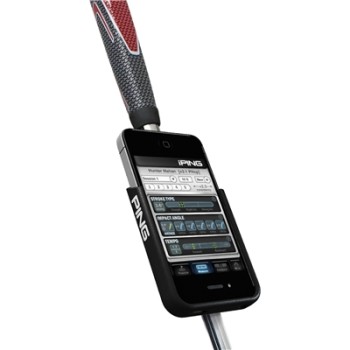
In order to use the app you will require a mount on your putter, such as the iPing Cradle (available for $30 from Golf Town). For all you golf nuts, this free app might be worth a try.
[http://cdn.iphoneincanada.ca/wp-content/uploads/2012/04/iPING_iPhone_2000X2000-350x350.jpg]<http://www.iphoneincanada.ca/?attachment_id=56546>
Click here to download iPerfectPutt<http://itunes.apple.com/ca/app/iperfectputt/id516374063?mt=8>–it's free.
Original Post:
http://feedproxy.google.com/~r/iphoneincanada/~3/HCse0Xae_U0/
The free iPerfectPutt features provide the following measurements of your putting strokes:
• Swing tempo (backswing/downswing durations)
• Swing plane deviation (inside/outside)
• Clubface angle deviation (open/closed)
• Putt weight (backswing angle, clubhead speed)
iPerfectPutt also provides a free and adjustable metronome to help you practice your swing tempo.
In-app purchases will unlock more features such as the ability to save captured strokes, realtime auditory feedback on all aspects of your putting stroke, simulation of your stroke compared to a reference stroke, and comprehensive data graphs to offer feedback.
In an interview with the CBC, professor Samuel Gaudet noted his motivation to create the app was to improve his short game (like the rest of us), via his math background and use of statistical analysis, and was 1.5 years in the making.
[http://cdn.iphoneincanada.ca/wp-content/uploads/2012/04/iperfectputt-243x350.jpg]<http://www.iphoneincanada.ca/?attachment_id=56548> [http://cdn.iphoneincanada.ca/wp-content/uploads/2012/04/iperfectputt2-243x350.jpg] <http://www.iphoneincanada.ca/?attachment_id=56547>
In order to use the app you will require a mount on your putter, such as the iPing Cradle (available for $30 from Golf Town). For all you golf nuts, this free app might be worth a try.
[http://cdn.iphoneincanada.ca/wp-content/uploads/2012/04/iPING_iPhone_2000X2000-350x350.jpg]<http://www.iphoneincanada.ca/?attachment_id=56546>
Click here to download iPerfectPutt<http://itunes.apple.com/ca/app/iperfectputt/id516374063?mt=8>–it's free.
Original Post:
http://feedproxy.google.com/~r/iphoneincanada/~3/HCse0Xae_U0/
Subscribe to:
Posts (Atom)