After fielding a number of questions around this topic recently, its come to my attention that there is a misunderstanding on how to implement the vSphere Storage Appliance (VSA) for certain ROBO solutions. The requirement around the tie-breaker code (VSA Cluster Service) is either misunderstood or misinterpreted when it comes to 2 node VSA deployments at remote office/branch office (ROBO) sites.
Let's be clear about it now – the VSA needs 3 votes in order to function correctly as a cluster. In a 3 node VSA deployment, this is not an issue since each node gets a vote. In a 2 node VSA deployment, the third vote is handled by the VSA Cluster Service aka the tie-breaker code.
Now, in standard (non ROBO) 2 node VSA deployments where the vCenter is located in the same datacenter as the VSA, the VSA Cluster Service can exist on the vCenter server. During VSA installation, you simply provide the IP address of the vCenter server for the VSA Cluster Service.
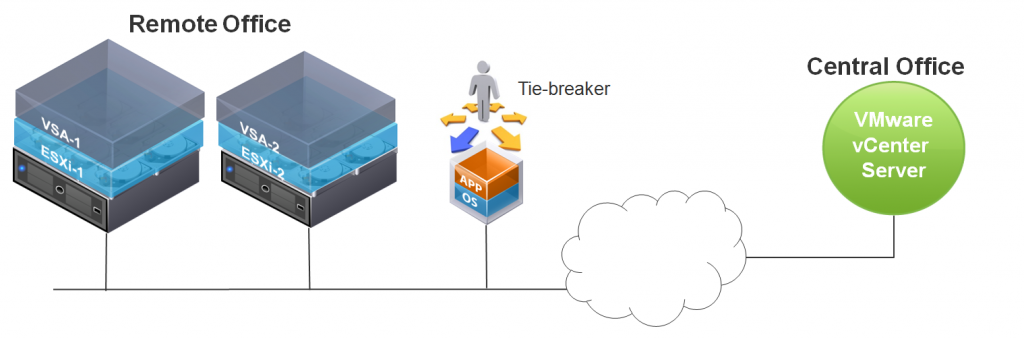
However, in ROBO deployments, things are a little different. In these deployments, the vCenter server is typically located at a central office, and the 2 node VSA is deployed at a remote office. The third vote (tie-breaker code) must also be located at the remote office/branch office. To cater for this, we allow the VSA Cluster Service to be decoupled from vCenter and installed in a VM. The VM can be running on a non-VSA ESXi host or Workstation at the branch office. We cannot have it run on the ESXi hosts involved in the VSA cluster because if we lost the host on which the tie-breaker VM was running, we lose 2 votes, and thus the cluster quorum. So it must exist outside of the VSA.
[http://blogs.vmware.com/vsphere/files/2012/10/diag-1024x339.png]<http://blogs.vmware.com/vsphere/files/2012/10/diag.png>
VMware provides VSA Cluster Service installation documentation for the different platforms that we support. Currently there is Standalone VSA Cluster Service for Linux and a Standalone VSA Cluster Service for Windows. The VSA Cluster Service platform must be on the same subnet as the VSA cluster members.During the install, then installer will ask for details of which host has the tie-breaker code, so the VSA Cluster Service must be installed first. The VSA Installation wizard will then audit this, making sure that it can reach and communicate to the VSA Cluster Service code.
Please make sure you take into account the requirement for the VSA Cluster Service at the remote office/branch office site when designing or achitecting 2 node VSA ROBO solutions.
Get notification of these blogs postings and more VMware Storage information by following me on Twitter: @VMwareStorage<http://twitter.com/#%21/vmwarestorage>
blogs.vmware.com [X] <http://blogs.vmware.com/vsphere/2012/11/considering-vsa-for-robo-please-read-this.html> |by Cormac Hogan on November 1, 2012
◆
________________________________
Original Page: http://blogs.vmware.com/vsphere/2012/11/considering-vsa-for-robo-please-read-this.html
Thursday, November 1, 2012


Thursday, October 25, 2012
Nested ESXi 5.1 - vhv.enable = "TRUE"
I just wanted to put out a quick post to help others get their nested ESXi 5.1 labs running.
There are a pile of great articles out there on building nested environments, but the one portion I missed in building mine was the difference in the vhv.*** command between ESXi 5.0 and ESX1 5.1
So here is the simple breakdown:
ESXi 5.1 – You need to add the following line to the /etc/vmware/config file:
vhv.enable = “TRUE”
ESXi 5.0 – You need to add the following line to the /etc/vmware/config file:
vhv.allow = “TRUE”
I hope this saves you some time and eliminates the pain I suffered trying to get 5.1 working in my home lab J
Big thanks to William Lam for his #NotSupported vInception presentation and post at:
http://www.virtuallyghetto.com/2012/09/vinception-notsupported-slides-posted.html
Wednesday, October 24, 2012
Monday, October 22, 2012
VMware Mirage Available for Download Now - Eric Sloof
VMware Mirage offers a unique solution for endpoint management and recovery that combines image centralization and local execution. The images of the endpoints are cloned into the datacenter to enable the benefits of centralized management and recovery while leaving cached copies of the image on each endpoint for local (and offline) execution thereby preserving an uncompromised user experience.
Mirage centralizes the full desktop contents at the datacenter for management and protection purposes, distributes the execution of desktop workloads to the endpoints for superior user experience, and optimizes the synchronization in between. Mirage conceptually splits the PC into six layers, divided into two groups: IT centrally managed and user managed. The first group consists of a Base Image Layer, a Driver Library Layer, and a Departmental Application Layer (experimental). The second group consists of User-Application Layer, Machine Identity Layer and User Data Settings Layer.
These layers form an individually managed, centrally stored Centralized Virtual Desktop (CVD). CVDs are hardware-agnostic and can be easily migrated from one desktop (physical or virtual) to another, creating a wide range of use cases. The Mirage Client runs a copy of this CVD directly on the end point, so users can work offline, use processor-intensive applications, and enjoy predictable, native PC performance regardless of network connectivity.
[image]
The Mirage architecture includes VMware Mirage Server in the datacenter to centralize desktop management and protection; Mirage Client to create a local cache for optimal user experience at the endpoint, and advanced WAN optimization technology to speed bi-directional synchronization over the WAN.
http://www.vmware.com/products/desktop_virtualization/mirage.html
feedproxy.google.com [X] <http://feedproxy.google.com/~r/Ntpronl/~3/pLKbLvDxH1s/2210-VMware-Mirage-Available-for-Download-Now.html>
◆
________________________________
Original Page: http://feedproxy.google.com/~r/Ntpronl/~3/pLKbLvDxH1s/2210-VMware-Mirage-Available-for-Download-Now.html
Sent from Feeddler RSS Reader
Mirage centralizes the full desktop contents at the datacenter for management and protection purposes, distributes the execution of desktop workloads to the endpoints for superior user experience, and optimizes the synchronization in between. Mirage conceptually splits the PC into six layers, divided into two groups: IT centrally managed and user managed. The first group consists of a Base Image Layer, a Driver Library Layer, and a Departmental Application Layer (experimental). The second group consists of User-Application Layer, Machine Identity Layer and User Data Settings Layer.
These layers form an individually managed, centrally stored Centralized Virtual Desktop (CVD). CVDs are hardware-agnostic and can be easily migrated from one desktop (physical or virtual) to another, creating a wide range of use cases. The Mirage Client runs a copy of this CVD directly on the end point, so users can work offline, use processor-intensive applications, and enjoy predictable, native PC performance regardless of network connectivity.
[image]
The Mirage architecture includes VMware Mirage Server in the datacenter to centralize desktop management and protection; Mirage Client to create a local cache for optimal user experience at the endpoint, and advanced WAN optimization technology to speed bi-directional synchronization over the WAN.
http://www.vmware.com/products/desktop_virtualization/mirage.html
feedproxy.google.com [X] <http://feedproxy.google.com/~r/Ntpronl/~3/pLKbLvDxH1s/2210-VMware-Mirage-Available-for-Download-Now.html>
◆
________________________________
Original Page: http://feedproxy.google.com/~r/Ntpronl/~3/pLKbLvDxH1s/2210-VMware-Mirage-Available-for-Download-Now.html
Sent from Feeddler RSS Reader
Monday, October 15, 2012
Free vCenter Operations Manager Now Included with vSphere - Eric Sloof
vCenter Operations Manager Foundation will give you insights and visibility into performance and health of your vSphere infrastructure and is now included free with VMware vSphere.
VMware vCenter Operations Management Suite<http://www.vmware.com/files/pdf/vcenter/VMware-vCenter-Operations-DS-EN1.pdf> provides automated operations management using patented analytics and an integrated approach to performance, capacity and configuration management.
vCenter Operations Management Suite enables IT organizations to get better visibility and actionable intelligence to proactively ensure service levels, optimum resource usage and configuration compliance in dynamic virtual and cloud environments.
vCenter Operations Manager Foundation<http://www.vmware.com/files/pdf/vcenter/VMware-vCenter-Operations-DS-EN1.pdf> is the new, entry-level edition of the vCenter Operations Management Suite. It gains deep operational insights and visibility to improve the performance and health of your vSphere environment. vCenter Operations Manager Foundation is included with every vSphere edition free of charge.
◆
________________________________
Original Page: http://feedproxy.google.com/~r/Ntpronl/~3/SJCYKTS1-O4/2206-Free-vCenter-Operations-Manager-Now-Included-with-vSphere.html
Sent from Feeddler RSS Reader
VMware vCenter Operations Management Suite<http://www.vmware.com/files/pdf/vcenter/VMware-vCenter-Operations-DS-EN1.pdf> provides automated operations management using patented analytics and an integrated approach to performance, capacity and configuration management.
vCenter Operations Management Suite enables IT organizations to get better visibility and actionable intelligence to proactively ensure service levels, optimum resource usage and configuration compliance in dynamic virtual and cloud environments.
vCenter Operations Manager Foundation<http://www.vmware.com/files/pdf/vcenter/VMware-vCenter-Operations-DS-EN1.pdf> is the new, entry-level edition of the vCenter Operations Management Suite. It gains deep operational insights and visibility to improve the performance and health of your vSphere environment. vCenter Operations Manager Foundation is included with every vSphere edition free of charge.
◆
________________________________
Original Page: http://feedproxy.google.com/~r/Ntpronl/~3/SJCYKTS1-O4/2206-Free-vCenter-Operations-Manager-Now-Included-with-vSphere.html
Sent from Feeddler RSS Reader
vSphere Data Protection (VDP) and vSphere Replication (VR) Interoperability - VMware vSphere Blog
We have been getting a fair number of questions regarding interoperability of vSphere Data Protection (VDP) and vSphere Replication (VR) both of which are included with vSphere 5.1 (Essentials Plus and higher). I spent some time in my lab with these questions and decided to focus on the two most common questions: 1. Does VDP and VR interfere with each other? 2. Can I use VR to replicate VDP to another site?
For the first question/scenario, I set up replication for three virtual machines (VMs). With VR, you can set the Recovery Point Objective (RPO) within the range of 15 minutes to 24 hours. I chose 15 minutes for all three VMs to maximize the frequency of VR operations against the VMs. I also made sure that one of the VMs was performing an initial sync. The initial sync in VR is when the entire VM is being replicated from the source to the target location for the first time. Once the initial sync is complete, only the changes to the VM are replicated to minimize bandwidth usage and maintain RPO policy compliance. Having VMs with VR performing an initial sync and regular (lightweight delta) syncs allowed testing against both replication status types. Having both replication status types running in the environment, I then ran several manually backup jobs using VDP. These jobs consisted of both the initial full (entire VM) backup and the subsequent synthetic full (changed blocks) backups. VDP and VR performed well together. The only hint of an issue that I saw was a warning message stating that replication for a VM is not active. This occurred when I manually started a replication cycle and a backup at the same time. The warning went away within a minute or two and I found no evidence that either job had any failures. VDP reported a successful backup and VR reported "OK" for the replication status a few minutes later suggesting VR simply retried replication. I also let the environment "simmer" for a few days leaving the RPO setting for the VMs at 15 minutes and VDP running its scheduled backup jobs for the same VMs once per day. Again, no evidence of issues.
For the second question/scenario, I configured VR to replicate the VDP appliance and set the RPO to its most aggressive setting of 15 minutes. I configured replication during the middle of the day. At that time, the backup window was closed and scheduled to open at 8:00 PM. The initial sync completed fine, as expected. However, once the backup window opened and the scheduled backups started, a warning message was logged: "System has paused replication for virtual machine vSphere Data Protection on host in cluster Cluster in Datacenter: Disk added to VM". As part of the backup process, VDP (along with several other backup and recovery solutions) utilizes the SCSI HotAdd functionality of vSphere to improve backup job efficiency and to keep backup traffic off of the network. The .vmdk being backed up is dynamically attached to the VDP appliance while the backup is occurring. VR detected the addition of the .vmdk file and paused. Replication of the VDP appliance was paused indefinitely and required manual intervention to reconfigure replication for the VDP appliance. This issue occurred every time the backup window opened. The RPO could be changed to make the replication occur less frequently – perhaps a RPO policy somewhere between 18 and 24 hours – thus reducing the chance replication will occur when backup jobs are running. This still does not guarantee that VR will not attempt to replicate changes to the VDP appliance at the same time backup jobs are running.
In summary, there appears to be no issues with both VR and VDP protecting a VM. In contrast, it is not recommended to use VR to replicate a VDP appliance. In an upcoming article, I will look at recovering VDP from a (non-VR) replicated or cloned copy of the VDP appliance. Stay tuned…
blogs.vmware.com [X] <http://blogs.vmware.com/vsphere/2012/10/vdp-and-vr-interoperability.html> |by Jeff Hunter on October 15, 2012
◆
________________________________
Original Page: http://blogs.vmware.com/vsphere/2012/10/vdp-and-vr-interoperability.html
Sent from Feeddler RSS Reader
For the first question/scenario, I set up replication for three virtual machines (VMs). With VR, you can set the Recovery Point Objective (RPO) within the range of 15 minutes to 24 hours. I chose 15 minutes for all three VMs to maximize the frequency of VR operations against the VMs. I also made sure that one of the VMs was performing an initial sync. The initial sync in VR is when the entire VM is being replicated from the source to the target location for the first time. Once the initial sync is complete, only the changes to the VM are replicated to minimize bandwidth usage and maintain RPO policy compliance. Having VMs with VR performing an initial sync and regular (lightweight delta) syncs allowed testing against both replication status types. Having both replication status types running in the environment, I then ran several manually backup jobs using VDP. These jobs consisted of both the initial full (entire VM) backup and the subsequent synthetic full (changed blocks) backups. VDP and VR performed well together. The only hint of an issue that I saw was a warning message stating that replication for a VM is not active. This occurred when I manually started a replication cycle and a backup at the same time. The warning went away within a minute or two and I found no evidence that either job had any failures. VDP reported a successful backup and VR reported "OK" for the replication status a few minutes later suggesting VR simply retried replication. I also let the environment "simmer" for a few days leaving the RPO setting for the VMs at 15 minutes and VDP running its scheduled backup jobs for the same VMs once per day. Again, no evidence of issues.
For the second question/scenario, I configured VR to replicate the VDP appliance and set the RPO to its most aggressive setting of 15 minutes. I configured replication during the middle of the day. At that time, the backup window was closed and scheduled to open at 8:00 PM. The initial sync completed fine, as expected. However, once the backup window opened and the scheduled backups started, a warning message was logged: "System has paused replication for virtual machine vSphere Data Protection on host in cluster Cluster in Datacenter: Disk added to VM". As part of the backup process, VDP (along with several other backup and recovery solutions) utilizes the SCSI HotAdd functionality of vSphere to improve backup job efficiency and to keep backup traffic off of the network. The .vmdk being backed up is dynamically attached to the VDP appliance while the backup is occurring. VR detected the addition of the .vmdk file and paused. Replication of the VDP appliance was paused indefinitely and required manual intervention to reconfigure replication for the VDP appliance. This issue occurred every time the backup window opened. The RPO could be changed to make the replication occur less frequently – perhaps a RPO policy somewhere between 18 and 24 hours – thus reducing the chance replication will occur when backup jobs are running. This still does not guarantee that VR will not attempt to replicate changes to the VDP appliance at the same time backup jobs are running.
In summary, there appears to be no issues with both VR and VDP protecting a VM. In contrast, it is not recommended to use VR to replicate a VDP appliance. In an upcoming article, I will look at recovering VDP from a (non-VR) replicated or cloned copy of the VDP appliance. Stay tuned…
blogs.vmware.com [X] <http://blogs.vmware.com/vsphere/2012/10/vdp-and-vr-interoperability.html> |by Jeff Hunter on October 15, 2012
◆
________________________________
Original Page: http://blogs.vmware.com/vsphere/2012/10/vdp-and-vr-interoperability.html
Sent from Feeddler RSS Reader
Friday, October 5, 2012
Building VMware End-User Computing Solutions with VMware View Book - RTFM Education – Virtualization, VMware, Citrix
Phew. I know it's a long title. But I wanted to shoehorn the word "end-user computing" and Barry wanted "VMware View" in the title – so this is the mash-up we can up with.
It's our joint pleasure to finally make available the end-user computing book that myself, and fellow vExpert, Barry Coombs – have been work in on for sometime. We never thought when we embarked on the project that it would take this length of time. That was partly caused by us both having other projects on the table, and the review process colliding with the release of VMware View 5.1 and ThinApp 4.7.2. It was also delayed by my sojourns into other complementary technologies such as vShield, Teradici APEX, ThinApp Factory and Horizon Application Manager.
I do I'd like to thank my co-author, Barry Coombs. It was Barry who approached me shortly after completing my SRM 5.0 book with the idea to update my old View 4.5 guide to be View 4.6 piece. Back then it was small under-taking to retro fit the book with the new support for the "PCoIP Gateway Mode". Then quite quickly it became clear that with View 5.0 being released we might as well go the whole hog. Anyway, without Barry's interested I might have not even bothered with this book. Also I wanted to recognise that where I have the luxury of bags of free time during the day to write – Barry has to hold down a proper job, and house move at the same time. Well done, Barry!
We'd both like to take this opportunity to thank everyone one who has assisted in bringing this text to the Community.
We spent many long dark nights toiling away in our man-caves to complete this project. Barry would like to thank his wife Laura Coombs, and I would like to thank his long-term partner, Carmel Edwards – for all their support and patience during this time.
From VMware would like to thank – Spencer Pitts, Peter von Oven, Peter Björk, Christoph Harding and Matthew Northam. Additionally I would like to thank Aaron Black, Jared Cook, Alejandro Guzman, Alan LaMielle and Deam Flaming who helped greatly with the ThinApp Factory and Horizon Application Manager chapters.
We would also like to thank Paul Pindel of F5 Networks, Andrei Valentin of BitDefender and Elcio Mello of Teradici.
Finally, we would like to thank all the people in the vExperts Community and elsewhere who assisted in the review process including: Duco Jaspars, Gabrie Van Zantan, Chris Mohn, Jonathan Medd, Rick Al Eqesem, Bas Raayman, Jane Rimmer, Stu McHugh, Ivo Beerens, Chris Deardon, Bilal Hashmi, James Bowling, Brian Jordon, Shane Williford, Andrew Hancock, Brian Suhr, Alex Muetstege, Dan Berkowitz, Matt Murray, Ryan Makamson, Julian Wood, Tim Myers, Matthew Northam, Alan Renouf, Michael Letschin and Kong L. Yang.
As special thanks goes to Christian Mohn who wrote the forward to the book.
For the now the book is only available on LULU as both a hard-copy or as PDF format. Given the length of the book and shipping costs incurred from LULU we would recommend downloading the PDF. Remember most e-readers support PDF or you can find tools that convert PDF into the format from your selected e-reader. The PDF is $10 to download – and there's a $10 royality charge on the hard-copy. These royalties will be paid to UNICEF as charitable donation after 1 year. It doesn't matter what you buy – the royality charge is the same. Of course the PDF isn't secured – but if people do see this winding up on other website. Let us know and we apply the usual community pressure.
We are also working on getting the book into the iBookStore, and via my contacts with Pearson Publishing – we are hoping to get it distributed on Safari Books Online too. That's very much a "work in progress"…
This may well be my last book for sometime. Believe it or not I've been solidly writing in the long form ever since I published my first "Admin" guides to ESX 2.x and VirtualCenter 1.x back in 2003/4. We'd would love to be able to keep this book up to date – we'd love to add AppBlast and Octopus when they are released. I'm sure Barry would be more than interested in working again with another author when View 6.0 rolls around the corner. As Barry and I are the sole copyright owners we are very flexible on this – I personally would love to see the book go online and be maintained and developed by the community. I think the days of technical material in paper books that are sealed in amber are rapidly drawing to a close.
Lastly, I recognise that there maybe people who are interested in ThinApp Factory<http://communities.vmware.com/docs/DOC-20095> and Horizon Application Manger<http://communities.vmware.com/thread/413086> – who have no interest in VMware View. I've decide to let these chapters be available separately as free download as well.
The book both in PDF is available NOW. The hard-copy will be online once me and Barry have recieved our personal copy and we are happy with the production quality.<http://www.lulu.com/spotlight/rtfm>
As with the VMware Site Recovery Manager 4.0 books all royalities will be donated to our chosen charity of UNICEF.
Enjoy!
[http://go.techtarget.com/activity/activity.gif?activityTypeId=24&dgtaxid=&tagid=0&r=1868265132]
itknowledgeexchange.techtarget.com [X] <http://itknowledgeexchange.techtarget.com/rtfm/building-vmware-end-user-computing-solutions-with-vmware-view-book/> |by MikeLaverick
◆
________________________________
Original Page: http://itknowledgeexchange.techtarget.com/rtfm/building-vmware-end-user-computing-solutions-with-vmware-view-book/
Sent from Feeddler RSS Reader
It's our joint pleasure to finally make available the end-user computing book that myself, and fellow vExpert, Barry Coombs – have been work in on for sometime. We never thought when we embarked on the project that it would take this length of time. That was partly caused by us both having other projects on the table, and the review process colliding with the release of VMware View 5.1 and ThinApp 4.7.2. It was also delayed by my sojourns into other complementary technologies such as vShield, Teradici APEX, ThinApp Factory and Horizon Application Manager.
I do I'd like to thank my co-author, Barry Coombs. It was Barry who approached me shortly after completing my SRM 5.0 book with the idea to update my old View 4.5 guide to be View 4.6 piece. Back then it was small under-taking to retro fit the book with the new support for the "PCoIP Gateway Mode". Then quite quickly it became clear that with View 5.0 being released we might as well go the whole hog. Anyway, without Barry's interested I might have not even bothered with this book. Also I wanted to recognise that where I have the luxury of bags of free time during the day to write – Barry has to hold down a proper job, and house move at the same time. Well done, Barry!
We'd both like to take this opportunity to thank everyone one who has assisted in bringing this text to the Community.
We spent many long dark nights toiling away in our man-caves to complete this project. Barry would like to thank his wife Laura Coombs, and I would like to thank his long-term partner, Carmel Edwards – for all their support and patience during this time.
From VMware would like to thank – Spencer Pitts, Peter von Oven, Peter Björk, Christoph Harding and Matthew Northam. Additionally I would like to thank Aaron Black, Jared Cook, Alejandro Guzman, Alan LaMielle and Deam Flaming who helped greatly with the ThinApp Factory and Horizon Application Manager chapters.
We would also like to thank Paul Pindel of F5 Networks, Andrei Valentin of BitDefender and Elcio Mello of Teradici.
Finally, we would like to thank all the people in the vExperts Community and elsewhere who assisted in the review process including: Duco Jaspars, Gabrie Van Zantan, Chris Mohn, Jonathan Medd, Rick Al Eqesem, Bas Raayman, Jane Rimmer, Stu McHugh, Ivo Beerens, Chris Deardon, Bilal Hashmi, James Bowling, Brian Jordon, Shane Williford, Andrew Hancock, Brian Suhr, Alex Muetstege, Dan Berkowitz, Matt Murray, Ryan Makamson, Julian Wood, Tim Myers, Matthew Northam, Alan Renouf, Michael Letschin and Kong L. Yang.
As special thanks goes to Christian Mohn who wrote the forward to the book.
For the now the book is only available on LULU as both a hard-copy or as PDF format. Given the length of the book and shipping costs incurred from LULU we would recommend downloading the PDF. Remember most e-readers support PDF or you can find tools that convert PDF into the format from your selected e-reader. The PDF is $10 to download – and there's a $10 royality charge on the hard-copy. These royalties will be paid to UNICEF as charitable donation after 1 year. It doesn't matter what you buy – the royality charge is the same. Of course the PDF isn't secured – but if people do see this winding up on other website. Let us know and we apply the usual community pressure.
We are also working on getting the book into the iBookStore, and via my contacts with Pearson Publishing – we are hoping to get it distributed on Safari Books Online too. That's very much a "work in progress"…
This may well be my last book for sometime. Believe it or not I've been solidly writing in the long form ever since I published my first "Admin" guides to ESX 2.x and VirtualCenter 1.x back in 2003/4. We'd would love to be able to keep this book up to date – we'd love to add AppBlast and Octopus when they are released. I'm sure Barry would be more than interested in working again with another author when View 6.0 rolls around the corner. As Barry and I are the sole copyright owners we are very flexible on this – I personally would love to see the book go online and be maintained and developed by the community. I think the days of technical material in paper books that are sealed in amber are rapidly drawing to a close.
Lastly, I recognise that there maybe people who are interested in ThinApp Factory<http://communities.vmware.com/docs/DOC-20095> and Horizon Application Manger<http://communities.vmware.com/thread/413086> – who have no interest in VMware View. I've decide to let these chapters be available separately as free download as well.
The book both in PDF is available NOW. The hard-copy will be online once me and Barry have recieved our personal copy and we are happy with the production quality.<http://www.lulu.com/spotlight/rtfm>
As with the VMware Site Recovery Manager 4.0 books all royalities will be donated to our chosen charity of UNICEF.
Enjoy!
[http://go.techtarget.com/activity/activity.gif?activityTypeId=24&dgtaxid=&tagid=0&r=1868265132]

itknowledgeexchange.techtarget.com [X] <http://itknowledgeexchange.techtarget.com/rtfm/building-vmware-end-user-computing-solutions-with-vmware-view-book/> |by MikeLaverick
◆
________________________________
Original Page: http://itknowledgeexchange.techtarget.com/rtfm/building-vmware-end-user-computing-solutions-with-vmware-view-book/
Sent from Feeddler RSS Reader
Subscribe to:
Posts (Atom)