This tool<http://itunes.apple.com/us/app/vpowercli5-reference/id489731144?mt=8&ls=1> is to be used for referencing the VMware vSphere 5 PowerCLI cmdlets. VMware vSphere PowerCLI<http://www.vmware.com/go/PowerCLI> is a powerful command line tool that lets you automate all aspects of vSphere management, including network, storage, VM, guest OS and more. PowerCLI is distributed as a Windows PowerShell snapin, and includes more than 300 PowerShell cmdlets, along with documentation and samples.
<http://itunes.apple.com/us/app/vpowercli5-reference/id489731144?mt=8&ls=1>[http://www.ntpro.nl/blog/uploads/powercliref.jpg][http://www.ntpro.nl/blog/uploads/powercliref1.jpg]
Original Post:
http://feedproxy.google.com/~r/Ntpronl/~3/OSBGL8ym71c/2063-vSphere-PowerCLI-5.0-reference-app-for-iPhone-and-iPad.html
Tuesday, June 5, 2012

![http://www.ntpro.nl/blog/uploads/powercliref.jpg][http://www.ntpro.nl/blog/uploads/powercliref1.jpg](http://www.ntpro.nl/blog/uploads/powercliref.jpg][http://www.ntpro.nl/blog/uploads/powercliref1.jpg)
Protecting Exchange 2010 with vShield 5.0
Enhancing Exchange 2010's Security Profile
In this post we will discuss using vShield to bolster the protection profile of Exchange 2010. We will start off with a brief discussion on vShield, and then move on to discussing the Exchange 2010 architecture, and then finally how we implemented vShield around Exchange 2010.
vShield 5.0 Overview
The VMware vShield product family is the foundation for trusted cloud infrastructures. vShield enables adaptive and cost-effective security services within a single management framework. vShield is a suite of products comprised of vShield Edge, vShield App, vShield Data Security, and vShield Endpoint. For purposes of this post, we will focus on two of the four products, vShield Edge and vShield App.
vShield Edge provides network edge security and gateway services to isolate VMs in a port group, vDS port group, or Cisco Nexus 1000v. vShield Edge is a stateful inspection firewall that can provide NAT, DHCP, IPsec Site to Site VPN VPN, and Web load balancing services for the virtual data center.
vShield App is a layer 2 / layer 3 virtualization aware, hypervisor based firewall that protects applications in the virtual datacenter from network based attacks. A major benefit to vShield App is configuring access control polices are based on logical and physical constructs versus purely physical constructs that a traditional firewall leverages. An example of this would be the ability to create rules based on a vApp (logical) versus IP Address (physical).
Exchange 2010 Architecture Overview
We built Exchange 2010 within the construct of a vApp. A vApp allows you to group VMs together and perform management functions against those VMs, such as power on, power off operations. vApp provide the ability to create 'nested' vApps. We leveraged this ability to create a multi-tier vApp for Exchange.
We created a root vApp labeled Exchange and then nested three different containers, based on Exchange 2010 roles (CAS, HUB, Mailbox). We then explicitly configured boot order within the CAS, HUB, and Mailbox vApps and at the Exchange Level.


We separated out the individual Exchange 2010 roles into individual VMs for the CAS, HUB, and mailbox roles. We used Exchange 2010 SP1 installed on Windows Server 2008 R2 Standard / Enterprise. We also configured the SAMESUBNETDELAY setting to 2000ms since we are using HA, DRS, and vMotion with DAG. More information on running DAG on the vSphere platform, see the whitepaper Using VMware HA, DRS, and vMotion with Exchange 2010 DAGs. The VMware software used in this configuration was vSphere 5.0 and vShield 5.0.

For networking we used the vSphere Distributed Switch with one Port Group for production traffic and a second Port Group dedicated to DAG replication traffic. In addition, we limited the number of ports in the DAG replication network to 2 so we would not have to worry about addition VMs being plugged into this Port Group. In the screen shot below, you can see the HUB01 and MBX01 VMs both using the Production dvPortGroup and the second vNIC on MBX01 using the ExchangeDAG dvPortgroup.

Once we got Exchange up and running we installed vShield. vShield installs default open so we were able to leverage the traffic flow reports inside vShield to assist us in creating the rules around Exchange 2010.
Building the Rules
As stated earlier, vShield installs default open which allows us to leverage the traffic flows within vApp to better understand communication activity amongst systems. We decided to gradually lock down Exchange 2010 by first configuring VM to VM rules, and then implementing port based rules based on the TechNet post detailing ports used by Exchange 2010: http://technet.microsoft.com/en-us/library/bb331973.aspx.
We built our rule sets using logical constructs within vCenter Server. For example, we built a rule stating the Mailbox vApp is allowed to communicate with the HUB vApp. By creating the rule against these logical constructs, any VMs placed into these containers will inherit the rules of that container.

As we built the rules we monitored traffic flows between Exchange 2010 systems, which was key in validating we correctly configured the rule sets and also identified other key traffic activities that were not documented in the aforementioned Ports Used by Exchange 2010 article. An example of this was UDP 139 from the Exchange vApp to our Domain Controller vApp.
Closing Remarks
Configure an external syslog server for vShield. As you build your rules, enable logging of the rule in order to validate enforcement of the rule. Start with general rules, like VM to VM rules and if necessary move down to port specific rules. Both of these will provide better protection, be sure to implement the appropiate level for your enviornment. Be aware that as the rules become more granular you must be more diligent to ensure all ports required by the application and OS are available. When you have validated your configuration is correct, change the default allow rule to deny.
Original Post: by Jeff Szastak
http://blogs.vmware.com/apps/2012/04/protecting-exchange-2010-with-vshield.html
Everything You Need to Know About Exchange Backups* - Part 1 - Exchange Team Blog - Site Home - TechNet Blogs
If you find the inner workings of Exchange data backups using Volume Shadown Copy<http://technet.microsoft.com/en-us/library/ee923636.aspx> (VSS) a bit mystifying take comfort in not being alone. Administrators may ask, "What's all the "freezing" and "thawing" I'm seeing in my event logs? What is the Exchange VSS Writer really, and what is it doing to my databases? How does it create a snapshot of a 135GB database in less than 60 seconds?"
If you ever asked these questions but only felt more confused with the answers, here's a guide to clear some of that up. To understand how a VSS backup of Exchange works it's critical to understand the basics of VSS itself. There is some excellent documentation on TechNet and MSDN on this, as well as the Windows Server Core Team blog, "Ask the Core Team.<http://blogs.technet.com/b/askcore/>" My esteemed colleague Randy Monteleone sums up the basics of VSS very nicely early in his post, while also providing links (repeated here) to some good TechNet primers on VSS:
How To: VSS Tracing – Randy Monteleone http://blogs.technet.com/b/askcore/archive/2012/04/29/how-to-vss-tracing.aspx
How Volume Shadow Copy Service Works
http://technet.microsoft.com/en-us/library/cc785914(WS.10).aspx
Volume Shadow Copy Service http://technet.microsoft.com/en-us/library/ee923636.aspx
If you're already familiar with at least the basics of VSS, then look forward to Part 2 in this series, where we will break down the events that occur in a VSS Exchange backup, and how Exchange logs them in the application event log.
If you need a quick primer or refresher on VSS basics and the Exchange Writer I've condensed them into some visual points below to complement the references above.
Snapshots
Bear in mind that VSS solutions for Exchange, and for all applications, vary greatly between different hardware and software configurations. There are clone and COW snapshots, hardware and software solutions, just a very wide variety of technologies based on the core VSS subsystem. For the purposes of understanding Exchange backups we're only going to illustrate one specific type of solution out of the multitude. Detailed below is what's called "copy-on-write", or "COW" snapshots.
In a COW snapshot-based VSS backup of Exchange we have the creation of snapshots of the disks where Exchange data is hosted. No matter what is getting backed up, even if it's a single database file and a few logs, VSS creates a snapshot of the entire disk where any data is stored. If the data resides across multiple disks, such as when an Exchange database is on one disk, and the logs are on another, VSS will create snapshots of any and all of those disks.
So what is a "snapshot"? A volume snapshot is an area of space inside what's called "shadow storage", which is itself a typically small area of space on the disk located in its System Volume Information folder.
After a disk snapshot is created a change to any data block from that time forward cannot get written until a copy of that block's data before the change (as it was when the snapshot was created) gets written to the differencing area in shadow storage. In this way the data on the disk at the time the snapshot was created is preserved, block by block, in the shadow storage area. The snapshot data is then available either from the original disk, if the data blocks requested haven't changed, or from the differencing area if they have. The fundamentals of this are illustrated below:
Disk E: has a snapshot created at 1PM:[http://blogs.technet.com/cfs-file.ashx/__key/communityserver-blogs-components-weblogfiles/00-00-00-31-06-metablogapi/7737.image_5F00_thumb_5F00_41108201.png]<http://blogs.technet.com/cfs-file.ashx/__key/communityserver-blogs-components-weblogfiles/00-00-00-31-06-metablogapi/4276.image_5F00_41E8E7EB.png>
A minute later one of the blocks gets written to, but not before the data as it was at 1PM gets preserved in the differencing area:[http://blogs.technet.com/cfs-file.ashx/__key/communityserver-blogs-components-weblogfiles/00-00-00-31-06-metablogapi/1462.image_5F00_thumb_5F00_34362BE3.png]<http://blogs.technet.com/cfs-file.ashx/__key/communityserver-blogs-components-weblogfiles/00-00-00-31-06-metablogapi/4682.image_5F00_794EF919.png>
As the actual disk changes the data as it was at 1PM gets written into shadow storage, preserving a record of the disk as it was in that moment:[http://blogs.technet.com/cfs-file.ashx/__key/communityserver-blogs-components-weblogfiles/00-00-00-31-06-metablogapi/1121.image_5F00_thumb_5F00_1674A124.png]<http://blogs.technet.com/cfs-file.ashx/__key/communityserver-blogs-components-weblogfiles/00-00-00-31-06-metablogapi/1856.image_5F00_376813CB.png>The following step:[http://blogs.technet.com/cfs-file.ashx/__key/communityserver-blogs-components-weblogfiles/00-00-00-31-06-metablogapi/1031.image_5F00_thumb_5F00_30686146.png]<http://blogs.technet.com/cfs-file.ashx/__key/communityserver-blogs-components-weblogfiles/00-00-00-31-06-metablogapi/8461.image_5F00_7176E0AA.png>In the figure above a backup server requests data from the snapshot of blocks 2 and 53. Block 53 from 1PM is preserved in the snapshot, so it's copied directly from shadow storage. Block 2 is unchanged since 1PM, so it is copied via the VSS driver VOLSNAP.SYS, which operates much like a filter driver underneath the NTFS.SYS file system driver. By working in the IRP stack (the part of kernel memory that manages disk I/O) underneath the file system it can read blocks of data without NTFS objecting that a file is in use. VOLSNAP.SYS is also responsible for ensuring blocks are copied over to shadow storage if a write is requested to them, hence the name "Copy On Write". Here is more about VOLSNAP.SYS from Tim McMichael:
Exchange / VSS / and differential block size… http://blogs.technet.com/b/timmcmic/archive/2011/07/12/exchange-vss-and-differential-block-size.aspx
Now that we've got the basics of a COW snapshot down let's look at how it works with Exchange, along with some other major concepts:
Microsoft Exchange Writer
So we know that any disk that stores Exchange data gets a snapshot created of it by VSS. How exactly, though, does a backup application find out which disks those are? Oftentimes an administrator selects databases for backup without specifying anything about what disks their data files are stored in. So something is required to provide the information about where the data files are, and therefore what disks VSS needs to create snapshots of. This information also tells a backup application, also known as a VSS requestor, what specific data files should be copied out of the snapshots for preservation on backup media, as we don't want to copy out anything from the disk we don't need.
The mechanism at work here is the Microsoft Exchange VSS Writer. Like any application's VSS writer (there are many, just run VSSADMIN LIST WRITERS to see them) its first job is to tell the backup application about the data needed for backup, especially the EDB file, logs, and checkpoint file for each database requested. The information about these specific Exchange data files is known as writer metadata.[http://blogs.technet.com/cfs-file.ashx/__key/communityserver-blogs-components-weblogfiles/00-00-00-31-06-metablogapi/3678.image_5F00_thumb_5F00_5270BD0C.png]<http://blogs.technet.com/cfs-file.ashx/__key/communityserver-blogs-components-weblogfiles/00-00-00-31-06-metablogapi/0447.image_5F00_7A836C2B.png>
In the figure above we see the initial steps of an Exchange backup. The Exchange Writer tells the backup server (the requestor) that there is a database located in a folder on volume E:, and that transaction logs for that database are in a folder on D:. Based on that information the backup application will request snapshots of the D: and E: volumes when the job progresses.
The Exchange VSS Writer serves another critical role besides providing metadata to VSS requestors. It also has the job of stopping writes to the databases and logs on disk, or "freezing" them, for the time it takes to create the necessary snapshots. A COW snapshot typically takes a small amount of time to create, as all it consists of initially is the designation of an area in shadow storage for blocks to be preserved in when they change on the actual disk. Despite this relatively quick operation it can still take up to a minute, which is plenty of time for blocks of data to change on a disk between the start and the end of its snapshot creation process. If blocks of data change but don't have the originals preserved from the exact time the snapshot creation begins those blocks may become inconsistent with other snapshot data, especially between logs, database, and checkpoint files. Hence, the Exchange Writer forces the Information Store Service, or the MS Exchange Replication Service, from writing what's in RAM to the frozen database files. In the case of the Information Store Service, the current transaction log file (Exx.log) gets rolled and closed out before the Exchange Writer allows VSS to take the snapshot. This ensures nothing changes in the file data between the beginning of the snapshot and the completion, at which point the databases are "thawed". When databases are thawed write I/O held in RAM is allowed to go to disk again.
Here's more information on how an application's VSS writer interacts with VSS with regards to freeze, thaws, and the time needed to get a snapshot completed:
::OnFreeze method http://msdn.microsoft.com/en-us/library/windows/desktop/aa381563(v=vs.85).aspx
The last major responsibility of the Exchange Writer is to tell the Information Store Service (MS Exchange Replication Service in the case of a passive copy backup) that the backup was completed and, if applicable, carry out post-backup tasks like log truncation, marking the database as no longer with a backup in progress, etc.
In the part two and part three of this series we'll look at a play-by-play breakdown of how the elements described above all come together in an Exchange backup, the application log events that get generated, and compare the process for a mounted database to that for a passive database copy.
Thanks go out for the collaboration on the content in these posts to Michael Blanton, Tim McMichael, Randy Monteleone, Dave Vespa, and Tom Kern.
By: Jesse Tedoff
Original Post:
http://blogs.technet.com/b/exchange/archive/2012/06/04/everything-you-need-to-know-about-exchange-backups-part-1.aspx
If you ever asked these questions but only felt more confused with the answers, here's a guide to clear some of that up. To understand how a VSS backup of Exchange works it's critical to understand the basics of VSS itself. There is some excellent documentation on TechNet and MSDN on this, as well as the Windows Server Core Team blog, "Ask the Core Team.<http://blogs.technet.com/b/askcore/>" My esteemed colleague Randy Monteleone sums up the basics of VSS very nicely early in his post, while also providing links (repeated here) to some good TechNet primers on VSS:
How To: VSS Tracing – Randy Monteleone http://blogs.technet.com/b/askcore/archive/2012/04/29/how-to-vss-tracing.aspx
How Volume Shadow Copy Service Works
http://technet.microsoft.com/en-us/library/cc785914(WS.10).aspx
Volume Shadow Copy Service http://technet.microsoft.com/en-us/library/ee923636.aspx
If you're already familiar with at least the basics of VSS, then look forward to Part 2 in this series, where we will break down the events that occur in a VSS Exchange backup, and how Exchange logs them in the application event log.
If you need a quick primer or refresher on VSS basics and the Exchange Writer I've condensed them into some visual points below to complement the references above.
Snapshots
Bear in mind that VSS solutions for Exchange, and for all applications, vary greatly between different hardware and software configurations. There are clone and COW snapshots, hardware and software solutions, just a very wide variety of technologies based on the core VSS subsystem. For the purposes of understanding Exchange backups we're only going to illustrate one specific type of solution out of the multitude. Detailed below is what's called "copy-on-write", or "COW" snapshots.
In a COW snapshot-based VSS backup of Exchange we have the creation of snapshots of the disks where Exchange data is hosted. No matter what is getting backed up, even if it's a single database file and a few logs, VSS creates a snapshot of the entire disk where any data is stored. If the data resides across multiple disks, such as when an Exchange database is on one disk, and the logs are on another, VSS will create snapshots of any and all of those disks.
So what is a "snapshot"? A volume snapshot is an area of space inside what's called "shadow storage", which is itself a typically small area of space on the disk located in its System Volume Information folder.
After a disk snapshot is created a change to any data block from that time forward cannot get written until a copy of that block's data before the change (as it was when the snapshot was created) gets written to the differencing area in shadow storage. In this way the data on the disk at the time the snapshot was created is preserved, block by block, in the shadow storage area. The snapshot data is then available either from the original disk, if the data blocks requested haven't changed, or from the differencing area if they have. The fundamentals of this are illustrated below:
Disk E: has a snapshot created at 1PM:[http://blogs.technet.com/cfs-file.ashx/__key/communityserver-blogs-components-weblogfiles/00-00-00-31-06-metablogapi/7737.image_5F00_thumb_5F00_41108201.png]<http://blogs.technet.com/cfs-file.ashx/__key/communityserver-blogs-components-weblogfiles/00-00-00-31-06-metablogapi/4276.image_5F00_41E8E7EB.png>


A minute later one of the blocks gets written to, but not before the data as it was at 1PM gets preserved in the differencing area:[http://blogs.technet.com/cfs-file.ashx/__key/communityserver-blogs-components-weblogfiles/00-00-00-31-06-metablogapi/1462.image_5F00_thumb_5F00_34362BE3.png]<http://blogs.technet.com/cfs-file.ashx/__key/communityserver-blogs-components-weblogfiles/00-00-00-31-06-metablogapi/4682.image_5F00_794EF919.png>


As the actual disk changes the data as it was at 1PM gets written into shadow storage, preserving a record of the disk as it was in that moment:[http://blogs.technet.com/cfs-file.ashx/__key/communityserver-blogs-components-weblogfiles/00-00-00-31-06-metablogapi/1121.image_5F00_thumb_5F00_1674A124.png]<http://blogs.technet.com/cfs-file.ashx/__key/communityserver-blogs-components-weblogfiles/00-00-00-31-06-metablogapi/1856.image_5F00_376813CB.png>The following step:[http://blogs.technet.com/cfs-file.ashx/__key/communityserver-blogs-components-weblogfiles/00-00-00-31-06-metablogapi/1031.image_5F00_thumb_5F00_30686146.png]<http://blogs.technet.com/cfs-file.ashx/__key/communityserver-blogs-components-weblogfiles/00-00-00-31-06-metablogapi/8461.image_5F00_7176E0AA.png>In the figure above a backup server requests data from the snapshot of blocks 2 and 53. Block 53 from 1PM is preserved in the snapshot, so it's copied directly from shadow storage. Block 2 is unchanged since 1PM, so it is copied via the VSS driver VOLSNAP.SYS, which operates much like a filter driver underneath the NTFS.SYS file system driver. By working in the IRP stack (the part of kernel memory that manages disk I/O) underneath the file system it can read blocks of data without NTFS objecting that a file is in use. VOLSNAP.SYS is also responsible for ensuring blocks are copied over to shadow storage if a write is requested to them, hence the name "Copy On Write". Here is more about VOLSNAP.SYS from Tim McMichael:


Exchange / VSS / and differential block size… http://blogs.technet.com/b/timmcmic/archive/2011/07/12/exchange-vss-and-differential-block-size.aspx
Now that we've got the basics of a COW snapshot down let's look at how it works with Exchange, along with some other major concepts:
Microsoft Exchange Writer
So we know that any disk that stores Exchange data gets a snapshot created of it by VSS. How exactly, though, does a backup application find out which disks those are? Oftentimes an administrator selects databases for backup without specifying anything about what disks their data files are stored in. So something is required to provide the information about where the data files are, and therefore what disks VSS needs to create snapshots of. This information also tells a backup application, also known as a VSS requestor, what specific data files should be copied out of the snapshots for preservation on backup media, as we don't want to copy out anything from the disk we don't need.
The mechanism at work here is the Microsoft Exchange VSS Writer. Like any application's VSS writer (there are many, just run VSSADMIN LIST WRITERS to see them) its first job is to tell the backup application about the data needed for backup, especially the EDB file, logs, and checkpoint file for each database requested. The information about these specific Exchange data files is known as writer metadata.[http://blogs.technet.com/cfs-file.ashx/__key/communityserver-blogs-components-weblogfiles/00-00-00-31-06-metablogapi/3678.image_5F00_thumb_5F00_5270BD0C.png]<http://blogs.technet.com/cfs-file.ashx/__key/communityserver-blogs-components-weblogfiles/00-00-00-31-06-metablogapi/0447.image_5F00_7A836C2B.png>


In the figure above we see the initial steps of an Exchange backup. The Exchange Writer tells the backup server (the requestor) that there is a database located in a folder on volume E:, and that transaction logs for that database are in a folder on D:. Based on that information the backup application will request snapshots of the D: and E: volumes when the job progresses.
The Exchange VSS Writer serves another critical role besides providing metadata to VSS requestors. It also has the job of stopping writes to the databases and logs on disk, or "freezing" them, for the time it takes to create the necessary snapshots. A COW snapshot typically takes a small amount of time to create, as all it consists of initially is the designation of an area in shadow storage for blocks to be preserved in when they change on the actual disk. Despite this relatively quick operation it can still take up to a minute, which is plenty of time for blocks of data to change on a disk between the start and the end of its snapshot creation process. If blocks of data change but don't have the originals preserved from the exact time the snapshot creation begins those blocks may become inconsistent with other snapshot data, especially between logs, database, and checkpoint files. Hence, the Exchange Writer forces the Information Store Service, or the MS Exchange Replication Service, from writing what's in RAM to the frozen database files. In the case of the Information Store Service, the current transaction log file (Exx.log) gets rolled and closed out before the Exchange Writer allows VSS to take the snapshot. This ensures nothing changes in the file data between the beginning of the snapshot and the completion, at which point the databases are "thawed". When databases are thawed write I/O held in RAM is allowed to go to disk again.
Here's more information on how an application's VSS writer interacts with VSS with regards to freeze, thaws, and the time needed to get a snapshot completed:
::OnFreeze method http://msdn.microsoft.com/en-us/library/windows/desktop/aa381563(v=vs.85).aspx
The last major responsibility of the Exchange Writer is to tell the Information Store Service (MS Exchange Replication Service in the case of a passive copy backup) that the backup was completed and, if applicable, carry out post-backup tasks like log truncation, marking the database as no longer with a backup in progress, etc.
In the part two and part three of this series we'll look at a play-by-play breakdown of how the elements described above all come together in an Exchange backup, the application log events that get generated, and compare the process for a mounted database to that for a passive database copy.
Thanks go out for the collaboration on the content in these posts to Michael Blanton, Tim McMichael, Randy Monteleone, Dave Vespa, and Tom Kern.
By: Jesse Tedoff
Original Post:
http://blogs.technet.com/b/exchange/archive/2012/06/04/everything-you-need-to-know-about-exchange-backups-part-1.aspx
Sunday, June 3, 2012
VMware vCenter Infrastructure Navigator v1.1 Demo Overview
Ben Scheerer, Sr. Product Manager at VMware, provides a demo, use cases and functionality of VMware vCenter Infrastructure Navigator (VIN) v1.1<http://www.vmware.com/products/datacenter-virtualization/vcenter-infrastructure-navigator>.
Original Post:
http://feedproxy.google.com/~r/Ntpronl/~3/V59QXrQ34E4/2061-VMware-vCenter-Infrastructure-Navigator-v1.1-Demo-Overview.html
Original Post:
http://feedproxy.google.com/~r/Ntpronl/~3/V59QXrQ34E4/2061-VMware-vCenter-Infrastructure-Navigator-v1.1-Demo-Overview.html
Saturday, June 2, 2012
vSphere 5.0 Hardening Guide - Official Release
This is the official release of the vSphere 5.0 Security Hardening Guide, v1.0. The format of this guide has changed from previous versions. The guide is being released as a Excel spreadsheet only. The guideline metadata from earlier guides has been greatly expanded and standardized. CLI commands for assessment and remediation of the guidelines is included for the vCLI, ESXi Shell, and PowerCLI.
[http://www.ntpro.nl/blog/uploads/gguide.png]
http://communities.vmware.com/docs/DOC-19605
[http://www.ntpro.nl/blog/uploads/gguide.png]
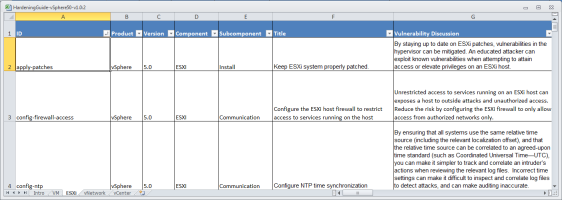
http://communities.vmware.com/docs/DOC-19605
Friday, June 1, 2012
Docking smartphones will be a key part of future, say IT pros | TechRepublic
I've written a lot about the potential convergence of smartphones and PCs — including recent pieces on Motorola Webtop<http://news.cnet.com/8301-1035_3-57417863-94/meet-googles-secret-weapon-for-fighting-apple-and-microsoft/>and Ubuntu for Android<http://news.cnet.com/8301-1035_3-57424335-94/androids-new-ally-against-the-iphone-ubuntu/> — but I recently polled TechRepublic's audience of IT professionals to get their take on whether they see these docking smartphones as legitimate PC replacements. This audience is notoriously ambivalent about tablets<http://www.techrepublic.com/blog/window-on-windows/poll-results-is-the-tablet-pc-form-factor-a-fad-or-a-glimpse-into-the-future/4324>, but they turned about to be surprisingly optimistic about smartphone/PC convergence playing a key role in the future of the enterprise.
As you can see in the chart below, 82% of the audience thinks docking smartphones will become an important part of business computing.
[http://i.techrepublic.com.com/blogs/poll-smartphone-hybrids-052012.jpg]
One TechRepublic member<http://www.techrepublic.com/members/profile/4952024> aptly summed up the argument for why this could make sense:
"Many business and personal users may find a small computing device like a smartphone that can morph in to desktop, laptop, or tablet a very attractive option… Cost is also a factor to consider. Many businesses already provide a smartphone and a desktop or laptop to their workers. There is a obvious cost savings potential here. For consumers, cost is a even more relevant factor and may drive many to these converged devices. From a personal perspective, I need a powerful workstation for work and for now smartphones don't cut it but for the rest of my computing needs I can see devices like these in my future."
Member buck_lane<http://www.techrepublic.com/members/profile/6858544> added:
"I love the idea of being able to point to one device and say 'thats got all the things!' I have a linux desktop and an android smartphone anyway, why not merge them? I know this will not be a full desktop replacement, as people still enjoy their high powered desktops for games, graphics and the like. The biggest feature is being able to take my secure connected work desktop with me where ever I go, less stuff to backup, and less environments to change and configure. Throw in a laser projector and keyboard and i'm good to go."
However, the concept certainly has its detractors as well. TechRepublic membervulpine<http://www.techrepublic.com/members/profile/1878820> wrote, "I think you'll find them a fad that flies for about a year or two and fades away again like the netbook of the middle '00s. Why? because with the exception of a rare few phones, too few have a standardized connection in a standardized location that would make such a docking system more universally favorable and very few people will want to buy a new docking display every time they buy a new phone."
[http://i.techrepublic.com.com/blogs/palm-touchstone-dock-052012.jpg]
While vulpine is right that a universal docking mechanism will definitely be needed, I think that will emerge in the years ahead. I expect that it will be a combination of wireless charging<http://reviews.cnet.com/8301-12261_7-57429616-10356022/wireless-charging-to-get-a-boost-from-samsung-qualcomm/> (like we saw pioneered by the Palm touchstone<http://www.hpwebos.com/us/products/accessories/touchstone-technology.html> — see photo on right) and wireless docking like we're going to get in Wireless USB<http://www.usb.org/developers/wusb/>. Some will argue that Wireless USB won't have enough bandwidth to drive displays. That's a fair argument, but the limitation will eventually be overcome.
Another user, Bob_or_Fred<http://www.techrepublic.com/members/profile/5182648>, summed up another one of the big concerns:
"With how often people break or lose their phones, there will be some big thinking as to why you're giving someone who only works at a desk a smartphone for a computer. Yes, people who are more mobile will get benefits from it, but not everyone is that mobile. In addition, the no-contract costs of smart phones is quite high, easily comparable or higher than a desktop. Additionally, there's lifespan. We have several desktops that have lasted 4 or 5 years, and we still use them (while admittedly, they are quite slow) because they still do what's needed. Oh and last of finally, when thinking of moving to a smartphone for a PC… Employee theft? All they have to do is wipe the memory and they have a black market ready phone, just replace the SIM card and you're good to go. (the non-removable SIM in the iPhone finally can be advertised as a feature!) At least they're easier to support. Software issues? Wipe and reimage. Hardware issues? Replace."
All in all, PC/smartphone convergence is going to be one of the key issues to watch over the next several development cycles in enterprise technology. BYOD, desktop virtualization, and cloud computing will obviously play key roles in this as well.
Original Post:
http://m.techrepublic.com/blog/hiner/docking-smartphones-will-be-a-key-part-of-future-say-it-pros/10604
As you can see in the chart below, 82% of the audience thinks docking smartphones will become an important part of business computing.
[http://i.techrepublic.com.com/blogs/poll-smartphone-hybrids-052012.jpg]

One TechRepublic member<http://www.techrepublic.com/members/profile/4952024> aptly summed up the argument for why this could make sense:
"Many business and personal users may find a small computing device like a smartphone that can morph in to desktop, laptop, or tablet a very attractive option… Cost is also a factor to consider. Many businesses already provide a smartphone and a desktop or laptop to their workers. There is a obvious cost savings potential here. For consumers, cost is a even more relevant factor and may drive many to these converged devices. From a personal perspective, I need a powerful workstation for work and for now smartphones don't cut it but for the rest of my computing needs I can see devices like these in my future."
Member buck_lane<http://www.techrepublic.com/members/profile/6858544> added:
"I love the idea of being able to point to one device and say 'thats got all the things!' I have a linux desktop and an android smartphone anyway, why not merge them? I know this will not be a full desktop replacement, as people still enjoy their high powered desktops for games, graphics and the like. The biggest feature is being able to take my secure connected work desktop with me where ever I go, less stuff to backup, and less environments to change and configure. Throw in a laser projector and keyboard and i'm good to go."
However, the concept certainly has its detractors as well. TechRepublic membervulpine<http://www.techrepublic.com/members/profile/1878820> wrote, "I think you'll find them a fad that flies for about a year or two and fades away again like the netbook of the middle '00s. Why? because with the exception of a rare few phones, too few have a standardized connection in a standardized location that would make such a docking system more universally favorable and very few people will want to buy a new docking display every time they buy a new phone."
[http://i.techrepublic.com.com/blogs/palm-touchstone-dock-052012.jpg]

While vulpine is right that a universal docking mechanism will definitely be needed, I think that will emerge in the years ahead. I expect that it will be a combination of wireless charging<http://reviews.cnet.com/8301-12261_7-57429616-10356022/wireless-charging-to-get-a-boost-from-samsung-qualcomm/> (like we saw pioneered by the Palm touchstone<http://www.hpwebos.com/us/products/accessories/touchstone-technology.html> — see photo on right) and wireless docking like we're going to get in Wireless USB<http://www.usb.org/developers/wusb/>. Some will argue that Wireless USB won't have enough bandwidth to drive displays. That's a fair argument, but the limitation will eventually be overcome.
Another user, Bob_or_Fred<http://www.techrepublic.com/members/profile/5182648>, summed up another one of the big concerns:
"With how often people break or lose their phones, there will be some big thinking as to why you're giving someone who only works at a desk a smartphone for a computer. Yes, people who are more mobile will get benefits from it, but not everyone is that mobile. In addition, the no-contract costs of smart phones is quite high, easily comparable or higher than a desktop. Additionally, there's lifespan. We have several desktops that have lasted 4 or 5 years, and we still use them (while admittedly, they are quite slow) because they still do what's needed. Oh and last of finally, when thinking of moving to a smartphone for a PC… Employee theft? All they have to do is wipe the memory and they have a black market ready phone, just replace the SIM card and you're good to go. (the non-removable SIM in the iPhone finally can be advertised as a feature!) At least they're easier to support. Software issues? Wipe and reimage. Hardware issues? Replace."
All in all, PC/smartphone convergence is going to be one of the key issues to watch over the next several development cycles in enterprise technology. BYOD, desktop virtualization, and cloud computing will obviously play key roles in this as well.
Original Post:
http://m.techrepublic.com/blog/hiner/docking-smartphones-will-be-a-key-part-of-future-say-it-pros/10604
ChannelPro-SMB Readers’ Choice Awards - VMware Named The Best Virtualization Vendor
[http://blogs.vmware.com/.a/6a00d8341c328153ef0168ebfece28970c-800wi]<http://blogs.vmware.com/.a/6a00d8341c328153ef0168ebfece28970c-pi>VMware has been named a winner in the 2012 ChannelPro-SMB Readers' Choice Awards<http://bit.ly/Lefojj> in the category of Best Virtualization Vendor, as well as a runner-up in the categories of Vendor Partner Program: Best Sales Support, Vendor Partner Program: Best Technical Support, and Vendor Partner Program: Best Training Programs.
Readers of ChannelPro-SMB were invited to participate in the channel's first SMB-focused Readers' Choice Awards by casting their votes for the most SMB- and partner-friendly products, technologies, services, programs, and professional organizations in the channel today, via the publication's website. For each category, readers were asked to select the option that best satisfies the unique business requirements, work styles, and budgets of their small and midsize business clients, as well asthose that best serve their own partner organizations.
The multiple-choice survey, which provided space for write-in responses, was fielded in Q1 2012 and drew participation from nearly 1,000 VARs, MSPs, systems integrators, custom builders, and IT consultants in the channel.
Thank you!
An award like this isn't possible without our amazing customers. Thanks to your feedback, inspiration and insight, you push us to go farther… to offer more… to innovate and help you change the way IT can impact business results.
Don't think that we plan to stop now… there is more to come!
http://blogs.vmware.com/smb/2012/06/channelpro-smb-readers-choice-awards-vmware-named-the-best-virtualization-vendor.html
Readers of ChannelPro-SMB were invited to participate in the channel's first SMB-focused Readers' Choice Awards by casting their votes for the most SMB- and partner-friendly products, technologies, services, programs, and professional organizations in the channel today, via the publication's website. For each category, readers were asked to select the option that best satisfies the unique business requirements, work styles, and budgets of their small and midsize business clients, as well asthose that best serve their own partner organizations.
The multiple-choice survey, which provided space for write-in responses, was fielded in Q1 2012 and drew participation from nearly 1,000 VARs, MSPs, systems integrators, custom builders, and IT consultants in the channel.
Thank you!
An award like this isn't possible without our amazing customers. Thanks to your feedback, inspiration and insight, you push us to go farther… to offer more… to innovate and help you change the way IT can impact business results.
Don't think that we plan to stop now… there is more to come!
http://blogs.vmware.com/smb/2012/06/channelpro-smb-readers-choice-awards-vmware-named-the-best-virtualization-vendor.html
Subscribe to:
Posts (Atom)